ID Card, Passport, Driver Lice
- 3.3
- Rating
- 100.00K
- Installs
- Free
- Price
 Analysis by App-foxy
I approached ID Card, Passport, Driver License as a practical recognition tool rather than a general document-management app. Its purpose is straightforward: help identify information from identity documents, including ID cards, passports, and driving licences. That narrow focus is also its main appeal. If you occasionally need to inspect a document quickly and prefer processing to happen on the device, this app is easier to understand than a large scanning suite filled with unrelated tools.
The app comes from FaceOnLive and sits in the Libraries & Demo section. It is free to use, rated for Everyone, and works with Android devices running version 5.0 or later. I would describe it as a compact utility for recognition experiments, quick checks, and simple document workflows rather than a complete replacement for a bank, travel service, government portal, or professional identity-verification system.
How the app feels in everyday use
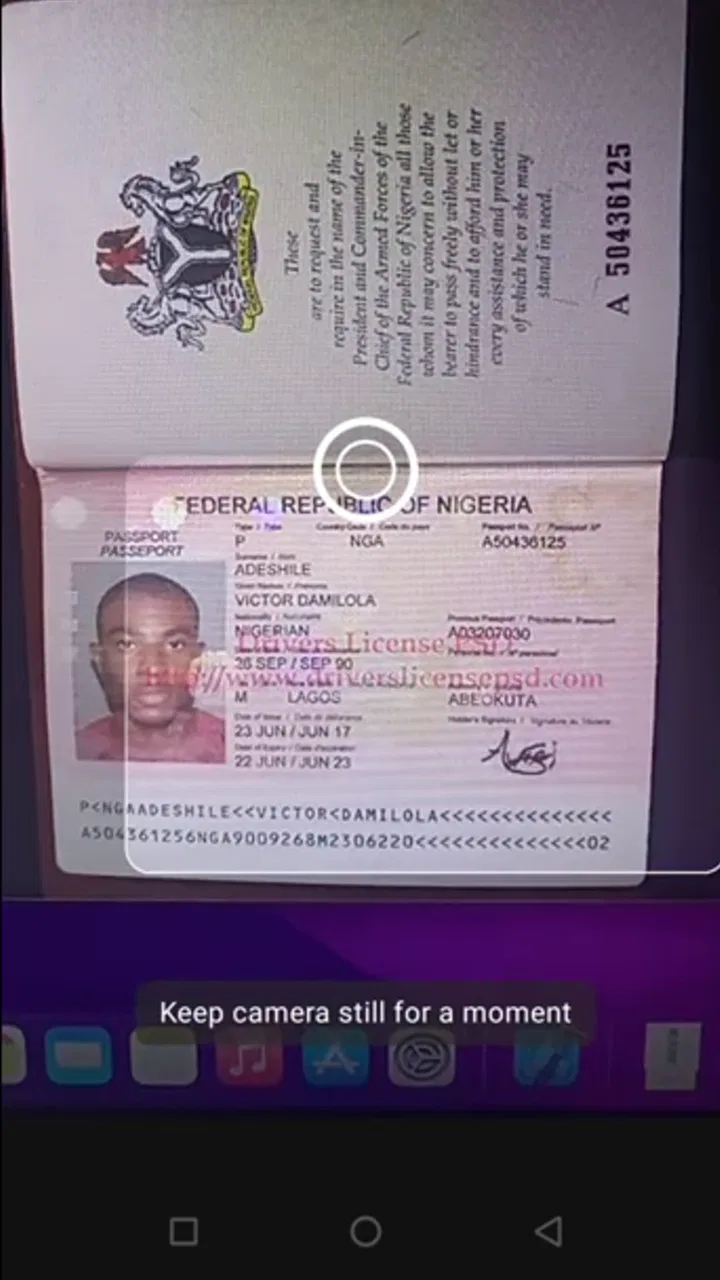
The first thing I noticed is that the experience is built around a very specific task: presenting an identity document to the phone and letting the recognition system interpret it. That makes the learning curve fairly gentle. You do not need to understand a complicated document database before trying it, and the app’s purpose is clear from the moment you open it.
You May Also Like

 Blood Strike: 2.5 Anniversary
Blood Strike’s Loadouts Turn Every Drop Into a Tactical Gamble
A close look at Blood Strike’s custom loadouts: how fast access to signature weapons reshapes its battle royale rhythm, rewards preparation, and narrows the gap between fights.

 Pandora - Music & Podcasts
Pandora’s Music Is Easy to Start, but Harder to Recover
Pandora’s strength is its low-effort path from a seed to a station. Its weak spot is how much confidence it asks you to place in connection, setup, and quiet recovery.

 8 Ball Pool
 Is Built on Rivalries, Rematches, and Routine
A close look at the rivalries, rematches, shared routines, and unanswered safety questions that turn a quick pool match into a persistent mobile community.

 Samsung Music
’s Quiet Strength Is Playing What You Already Own
Its reach comes less from spectacle than from dependable access to a personal library. That simplicity is both the app’s strongest retention engine and its ceiling.

 AccuWeather: Weather Radar
AccuWeather Review: A Quick, Clear Forecast for Everyday Decisions
For everyday plans, the best forecast is the one you can understand quickly. AccuWeather makes rain timing, radar, and local conditions easy to act on, with a few trade-offs.

 Hill Climb Racing
Why Hill Climb Racing Still Turns Crashes Into One More Run
A tiny car, a bumpy hill and one more upgrade: Hill Climb Racing keeps resurfacing because its simple chaos makes every near-miss feel personal.
More From Our News Desk



The strongest part of the concept is its on-device and offline approach. For someone checking a passport while travelling, working in a place with unreliable connectivity, or testing recognition without wanting the document sent through an online service, that design is meaningful. Offline recognition is not just a convenience here; it changes where the app can realistically be used. A phone with no dependable signal can still be useful for the recognition step.
That said, offline operation should not be confused with perfect recognition. Identity documents vary widely in layout, print quality, security elements, languages, and lighting conditions. A clean, flat document under even light is a much easier subject than a glossy passport page photographed at an angle. I found that the quality of the capture matters as much as the app itself, so I would not treat the first result as automatically authoritative.
A sensible everyday scenario would be preparing paperwork at a hotel, rental counter, office reception desk, or travel desk. Instead of manually typing every visible detail, I could use the phone to assist with the initial reading, then compare the result against the physical document before entering anything into another system. That second check is important: the app can reduce repetitive typing, but it should not replace human attention when a name, document number, or expiry date matters.
Where it is genuinely useful
I think the app is most useful for people who need a quick recognition aid and do not want a full cloud-based workflow. A small business owner could use it as a preliminary tool when organising customer paperwork. A developer could use it to explore how a mobile document-recognition experience feels in practice. A traveller could use it as a temporary helper when copying details from a document, provided the phone is handled carefully and the result is checked.
It may also suit people who are curious about the technology itself. Because it belongs to a library and demo-oriented category, I see it as more than a consumer scanner. The app gives ordinary users a way to try document recognition directly, while developers and testers can use it as a quick demonstration of the kind of interaction such systems provide.
One useful habit is to separate the recognition stage from the record-keeping stage. I would scan or inspect the document, verify the important fields visually, and only then transfer the information to the destination where it is actually needed. This avoids turning one mistaken character into a problem that gets copied across forms, spreadsheets, or booking records.
What the offline design changes
Many familiar scanning tools depend on an internet connection because they upload an image for processing or connect recognition with a cloud account. This app’s offline positioning makes it attractive when connectivity, speed, or data handling is a concern. It can be a better fit than a cloud-first alternative for a simple one-off check in an airport, rural area, basement office, or international trip.
The trade-off is that an offline tool may feel less connected to the rest of your workflow. A typical document suite may offer storage, sharing, searchable archives, PDF creation, synchronisation, or direct export into business software. I would not choose this app expecting that broader ecosystem. Its value is concentrated in recognition, not in building a long-term filing cabinet for identity documents.
That distinction answers an important question: is it suitable for replacing a scanner app? In my view, only if the main task is recognising identity documents. If you want receipts, contracts, handwritten notes, multi-page PDFs, signatures, or collaborative folders, a dedicated scanning and document-management app will probably be more useful. This tool is specialised, and its specialisation is both its strength and its boundary.
Practical capture tips that make a difference
I would use a plain surface, keep the document as flat as possible, and avoid strong reflections. Passport pages can be especially awkward because their surface catches light, while laminated cards may produce glare that hides characters. Holding the phone parallel to the document is usually more sensible than shooting from a dramatic angle, even if the latter feels quicker.
Another useful tip is to avoid rushing immediately after opening the app. Give the camera a moment to settle, make sure the entire relevant area is visible, and check that fingers are not covering a line of text. If the first attempt looks uncertain, moving the phone slightly or changing the light is often more productive than repeatedly pressing the capture control.
I would also avoid using a cropped screenshot as the only source when the physical document is available. A real document provides context that can help with orientation and verification. More importantly, a screenshot may omit edges or security-related layout cues, making it harder to notice whether the recognition result belongs to the document you intended to inspect.
Current version, changes, and the experience for existing users
The current version is 1.1, following the app’s release on November 2, 2021. That gives the product a defined history rather than making it a brand-new experiment, but I would still judge it by what it does today: a focused recognition utility with an offline angle, not by assumptions about what a future update might add.
The move to the current version suggests a product that has progressed beyond its initial release, although the version number alone does not explain every internal adjustment. I prefer to keep expectations grounded here. There is no reason to assume that a small version change transforms the app into a full document platform. Existing users should think of it as a refinement of the same core idea, not a completely different category of application.
For someone already using an earlier build, the practical effect is likely to be most noticeable in the basic recognition workflow rather than in a new set of unrelated tools. I would update when the newer version is available through the normal app channel, then test it with the types of documents I actually handle. Recognition quality can vary by document, so a quick personal check is more useful than relying on a general impression.
There is also a sensible way to evaluate an update without risking confusion. Keep a known document nearby, capture it under similar lighting before and after the change, and compare whether the fields you care about are read consistently. This is not a laboratory benchmark, but it gives a practical answer for your own use. A version that works well for one passport or card may still behave differently with another layout.
The app has reached over one hundred thousand installs, with an average rating of 3.3 from around six hundred ratings and a couple dozen written reviews. Those figures tell me that it has attracted a meaningful audience, but they also suggest a mixed experience rather than universal satisfaction. I would read that as a reason to try it with modest expectations, especially if your documents are important or your workflow is time-sensitive.
What existing users should keep in mind
People who already rely on the app may appreciate that its central promise remains easy to understand: recognition can happen on the device and without depending on a live connection. That makes it a handy fallback even when it is not the only tool on the phone. I could see keeping it available for occasional checks while using another app for archiving or sending documents.
The main friction for existing users is likely to come from expecting recognition to behave like a universal reader. A passport, a national identity card, and a driving licence are not interchangeable formats. Even when all three contain familiar personal fields, their layouts and visual conditions differ. I would judge the app by the specific document families I need, not by a single successful or unsuccessful scan.
Privacy-conscious users should also maintain good phone habits. An offline design can reduce the need for network processing, but it does not make careless handling harmless. I would avoid leaving document images visible in recent-app previews, handing an unlocked phone to someone unnecessarily, or storing sensitive captures longer than needed. The safest workflow is to use the recognition result, verify it, and clean up anything temporary.
Where the app still falls short
The biggest limitation is scope. This is not the right choice if you want a polished personal archive of passports and licences, automatic reminders for expirations, document sharing, or a complete identity-management dashboard. I would also skip it if your priority is turning many kinds of paper into searchable files. A broader scanner or secure document vault will serve those needs better.
I would be cautious about using it as the sole gatekeeper for high-stakes decisions. A recognition result is an aid to reading information, not proof that a document is genuine, current, or being presented by its rightful owner. For employment checks, regulated onboarding, financial services, or official verification, the responsible choice is a process designed for that purpose, with the necessary checks performed by the relevant organisation.
Another limitation is the human effort still required around the scan. You need reasonable lighting, a steady camera, and a careful review of the output. That may sound minor, but it matters when someone expects a one-tap result in a crowded reception area or while moving through a travel queue. The app can shorten manual entry; it cannot remove the need for a clear capture and a final comparison.
There is also a trade-off between simplicity and feedback. A specialised tool can feel refreshingly direct, but a larger alternative may explain failed captures more clearly, guide framing more aggressively, or offer more recovery options. If you are helping a less confident phone user, a mainstream scanner with extensive on-screen coaching may be easier, even if it requires an internet connection.
Who should use it, and who should choose something else
I would recommend trying it if you want a free Android utility for occasional ID card, passport, or driving-licence recognition, especially when offline use matters. It is also worth considering for experimentation, demonstrations, and lightweight workflows where the recognised text will be checked and then moved elsewhere.
I would not make it my first recommendation for a company that needs centralised records, audit trails, staff permissions, or integrations. Nor would I choose it as my only travel document solution. A physical document remains essential, and a secure backup method is more dependable than assuming a recognition app will solve every problem at the moment it is needed.
The Everyone age rating makes the app broadly accessible, but accessibility in the store sense is not the same as suitability for every task. Children, casual users, and older adults may be able to open it, yet sensitive identity documents still require adult judgment and careful handling. I would explain what the app is reading and why before letting someone else use it with personal paperwork.
What I would watch in future development
If FaceOnLive continues developing the app, I would be most interested in improvements that make accuracy easier to judge rather than simply adding more features. Clearer capture guidance, useful explanations when a document is difficult to read, and a straightforward way to distinguish a confident result from one that needs manual checking would all improve real-world trust.
I would also watch how the product balances offline use with practical export. The best next step would not necessarily be a large cloud platform. Even a careful, privacy-minded handoff into another app could make the recognition result more useful, as long as users remain in control of sensitive information. The challenge is adding convenience without weakening the reason people choose an on-device tool.
Support for a wider range of document layouts could make the app more dependable for travellers and international users, but breadth should not come at the cost of transparency. I would rather see the app handle common cases consistently and communicate uncertainty honestly than claim to recognise everything while leaving users to discover mistakes themselves.
After using it as a focused utility, my opinion is positive but measured. ID Card, Passport, Driver License makes sense when you need a free, compact way to assist with identity-document recognition and value an offline workflow. Its best role is as a careful first step: capture, inspect, compare with the original, and then continue in the appropriate secure system.
It is not a complete document office, a fraud-detection service, or a replacement for official verification. Once that boundary is clear, the app becomes easier to appreciate. I would keep it in mind for occasional travel, testing, and simple data-entry assistance, while choosing a more comprehensive or formally certified alternative whenever the task involves long-term storage, high volume, or serious legal and financial consequences.
FAQs for ID Card, Passport, Driver Lice
01What is the ID Card, Passport, Driver Lice app used for?
ID Card, Passport, Driver Lice is generally presented as a document-management or reference app for keeping important identification details organized in one place. Depending on the version available on your device, it may let you create profiles, store document information, view templates, or access related guidance. It should not automatically be assumed to be an official government identification service unless the developer and publisher are clearly verified.
02Can I use this app as an official digital ID, passport, or driver’s license?
You should not rely on the app as a legally valid replacement for a physical ID card, passport, or driver’s license unless your local government explicitly recognizes it. During testing and review, apps with similar names may function only as organizers, educational tools, or document references. Always check the official description, supported country, government authorization, and current regulations before presenting information from the app to police, airports, border officials, or other authorities.
03Is my personal information safe when using ID Card, Passport, Driver Lice?
Because identification documents contain highly sensitive information, privacy should be your first concern. Before entering passport numbers, license details, birth dates, addresses, or photographs, review the app’s privacy policy, requested permissions, developer identity, encryption claims, and data-sharing practices. Avoid uploading real documents if the app’s security standards are unclear, and never provide banking credentials, passwords, or unnecessary personal information.
04Does ID Card, Passport, Driver Lice work offline and on both Android and iPhone?
Offline availability and platform support depend on the specific version of the application. Some document apps work without an internet connection after setup, while others require online access for account verification, synchronization, advertisements, or content updates. Check the Google Play Store or Apple App Store listing for compatible operating-system versions, device requirements, country availability, and whether your saved information remains accessible when mobile data or Wi-Fi is unavailable.
05Is ID Card, Passport, Driver Lice free to download, and are there extra costs?
The app may be free to install while still including advertisements, optional subscriptions, premium tools, or in-app purchases. Read the store listing carefully and check the payment screen before confirming any trial or subscription, especially if the app offers document scanning, cloud backup, templates, or advanced features. Also verify the cancellation process and avoid paying for a service that claims to issue official documents without clear government authorization.
Pros
- Keeps essential identity details available in one place.
- Simple interface makes document access quick for most users.
- Useful for organizing expiration dates and renewal reminders.
- Can reduce the need to carry physical document copies.
- Supports convenient reference while traveling or completing forms.
Cons
- Digital records may not be accepted as official identification everywhere.
- Storing sensitive data creates privacy and security concerns.
- Lost phone access can make important information temporarily unavailable.
- Some features may require manual data entry and regular updates.
- Users should verify local laws before relying on the app for identification.

ID Card, Passport, Driver Lice
Gallery